MON2 Soundscape Machine • Official Web Flasher
⚡ Firmware Flash Tool FW v2.5
Update and restore firmware for (o) MON 2 : SOUNDSCAPE MACHINE directly from your browser via Web Serial API. Fast, reliable, and secure.
Web Serial Firmware Flasher
● Ready to Connect
Latest Release Target: ESP32-S3 (8MB Flash)
MON2 Master Firmware v2.5
💡 Works out-of-the-box in Google Chrome, Microsoft Edge, Opera, or browsers with Web Serial API support.
Target DSP Core
ESP32-S3 (240MHz)
Firmware Binary
mon2_v1.bin (FW v2.5)
Total SPI Flash
8 MB (80 MHz DIO)
Sampler Storage
6.9375 MB (@0x110000)
Audio DAC Engine
16-bit 48kHz Stereo
Audio & Sync Out
3.5mm Stereo + SYNC
Display Interface
OLED SSD1306 (128x64)
Controls & Interface
9 RGB Pads + 5 Knobs
Flash Memory Layout (8MB SPI Flash Partition Layout)
| Flash Offset | Partition File | Partition Type | Size | Description |
|---|---|---|---|---|
| 0x00000 | bootloader.bin | Bootloader | 22 KB | ESP32-S3 Primary Bootloader |
| 0x08000 | partition-table.bin | Partitions | 3 KB | 8MB Partition Allocation Table |
| 0x09000 | nvs | Data / NVS | 24 KB | Stores 100 Presets, 4 Chord Banks, Sequencer Patterns |
| 0x10000 | mon2_v1.bin (FW v2.5) | App / Factory | 1 MB (668 KB Used) | MON2 System Firmware (Flashed via this page) |
| 0x110000 | storage (mon2wav.bin) | Data / SPIFFS | 6.9375 MB | Sampler Audio Bank (Flashed via WAV Converter) |
Drivers & Download Resources
If your computer does not detect the COM port when plugging in USB, install the CH9102F / CH34X USB-to-UART driver first:
Boot Mode Setup (Download Mode)
Required before flashing1
Turn OFF MON2 (Power OFF)
Important: Completely turn off the power switch first. If turned on, pressing B2 will not enter the bootloader.
2
Connect USB-C Cable
Connect the USB-C cable from your computer to the MON2 USB port (data-transfer cable required).
3
Hold B2 Button before powering ON (Do not release yet)
Press and hold button B2 (bottom row, center) on the MON2 control panel.
4
Turn Power ON while holding B2
While still holding B2, flip the power switch to ON. The device will enter Bootloader mode. You can then release B2.
5
Click Connect & Flash
Click Connect above, select the MON2 COM port, then click Install MON2 : Flash Tool and wait for 100% completion.
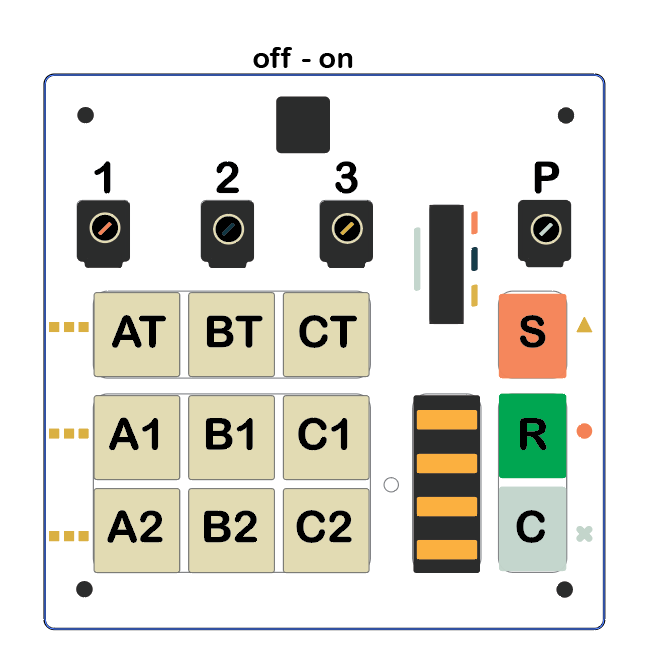
🔍 Location of button B2 (bottom row, center) to hold during power-on.

Quick Tips & Troubleshooting
Solutions for connection and flashing issues
Flashing does not start or stuck at Connecting
Verify that you held B2 button while turning Power ON. In normal boot, ESP32 runs application code and rejects flashing. Power OFF and turn ON again while holding B2.
COM Port not appearing in list
Try another USB port or USB-C cable (standard charging-only cables lack data lines and will not be detected by your computer).
Erase Device
If the device freezes, has abnormal parameters, or you want a fresh factory reset, check Erase device before clicking Install.
Firmware Release History & Changelog
Continuous updates for optimal performance and stability
FW 2.5
LATEST RELEASE
November 17, 2026
- Chord Mode Display Optimization (Loop Record vs Manual Play):
- In Chord Mode, when playing back via Loop Record, chord names are hidden on the OLED screen to eliminate visual clutter and repeated flashing.
- Chord names are displayed exclusively during direct manual playing (Manual Touch).
- Main Pitch Knob Lock Fix:
- Fixed knob responsiveness when mapped to Main Pitch; master pitch tuning now works immediately in standard mode without holding CLR.
- Soundscape Studio Suite & Playground Realtime Synchronization:
- Added high-speed real-time MIDI CC bidirectional communication for Soundscape Playground, 16-Step Sequencer, and Web MIDI Controller.
- Enhanced DSP Audio Engine stability and zero-latency response.
- Cutoff / Resonance Filter Engine v3.1 (Zipper Noise Fix):
- Upgraded filter to Cytomic TPT ZDF-SVF 24dB/oct with 2-stage smoothing, eliminating zipper noise when rapidly adjusting Cutoff and Resonance.
- Unified Cutoff/Res control with single-owner arbiter across Hardware Knobs, Pitch Knob, MIDI, and Rec Knob Playback.
- Extended Cutoff top range to 14 kHz and enabled OLED parameter display during Rec Knob playback.
FW 2.2
March 2026
- Added Boot Knob Lock (Delay Time):
- Added 3-second Boot Knob Lock delay on power-on to prevent saved presets from accidental alteration by physical knob positions.
- Hardware knobs are ignored until the delay window expires, accurately preserving active presets.
- Sampler Mode & Playwav Audio Fixes:
- Fixed 9PAD configuration bug affecting record buttons in Sampler Mode.
- Eliminated audio jitter and LED end-glitch in "1 Sh" and "onof" playback modes.
- LPF Noise Reduction & Resonance Tuning:
- Smoothed Low Pass Filter (LPF) frequency sweeps, eliminating stepping artifacts.
- Refined Resonance (Q) curve to prevent unwanted screeching.
FW 2.1
June 2025
- Added 6 Pattern storage slots with independent parameters per sampler voice.
- Added Fade In / Fade Out smoothing for Wave Sampler to ensure seamless sound looping.
FW 2.0
August 2024
- Added Step Sequencer mode (hold button for 3 seconds to enter).
FW 1.3
February 2024
- Added Sampler mode supporting 16-bit 48kHz playback (~40s total capacity) split across 3 voice groups [A1, A2], [B1, B2], [C1, C2].
- Added shortcut keys for fast page navigation (CLR + A1-C2) across Sampler, Voice, and Chord modes.
- Introduced 4-state knob catch algorithm: Locked, Ready, Inactive, Catch.
- Updated chord voicing table: [Maj, Maj7, Min, Min7, 7th, 9, Maj9].
FW 1.0 – 1.2
August – October 2023
- FW 1.2: Added USB MIDI Input for external note control.
- FW 1.1: Added 4 LEDs beneath hardware knobs.
- FW 1.0: Initial launch firmware (6 Oscillators, 12 Pages, Attack/Release, USB MIDI OUT).